How to Name Your SIM Cards for Easy Switching (Give Every Line a Different First Letter)
How to Name Your SIM Cards for Easy Switching (Give Every Line a Different First Letter)
By Chester Takau · October 2026
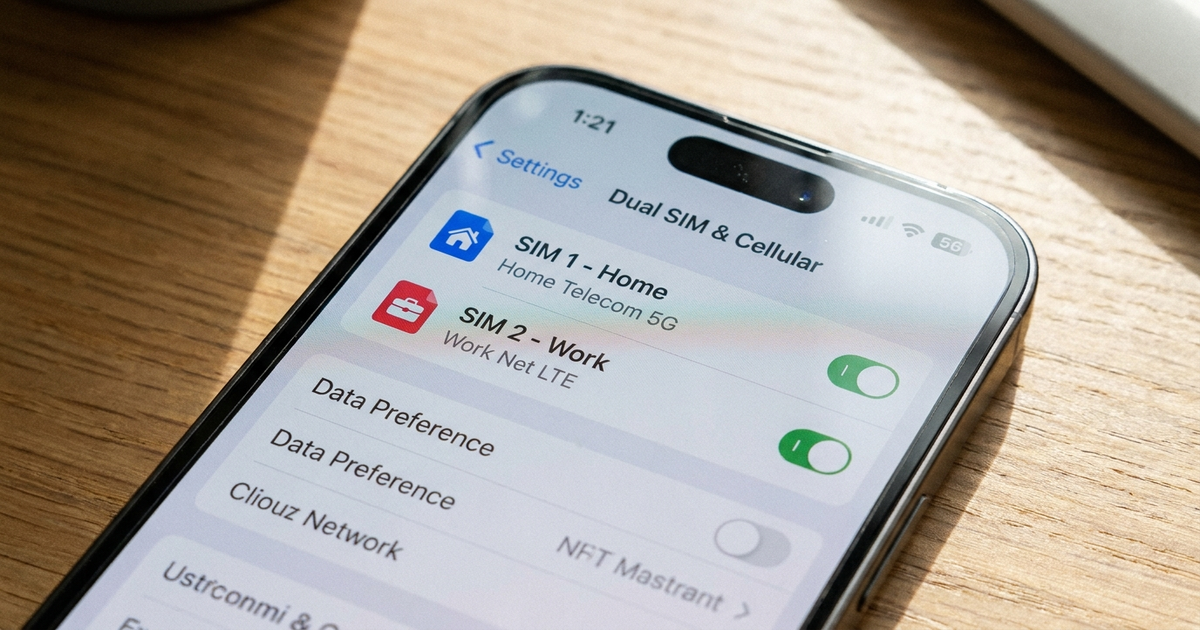
Open the SIM settings on your phone, tap a line, and change its label to something short and distinct, such as "Work" and "Home." On iPhone the path is Settings → Cellular → tap the number → Cellular Plan Label. On Samsung it is Settings → Connections → SIM manager → tap the SIM → Name. On Pixel it is Settings → Network & internet → SIMs → pencil icon. Start each name with a different letter, because iPhone badges show only the first letter.
The short version
- Pick names by purpose ("Work", "Home") or by region ("Asia - Work"), not by carrier alone
- Make the first letters differ: "Personal" and "Primary" both show as P
- Renaming is cosmetic. It does not change which line is used for calls or data
- Keep phone numbers and your full name out of labels
Chester Takau
Chester Takau is an independent reviewer of dual-SIM and eSIM technology, testing setups from the Pacific where connectivity choices really matter.
Where do I rename a SIM on each phone?
| Phone | Path | Worth knowing |
|---|---|---|
| iPhone | Settings → Cellular (or Mobile Data) → tap the number → Cellular Plan Label | Pick a preset or type a custom label. Guides say emoji work |
| Samsung Galaxy | Settings → Connections → SIM manager → tap the SIM → Name | Icons are presets. One German guide reports emoji are not accepted. Needs current software to show eSIM options |
| Google Pixel | Settings → Network & internet → SIMs → pencil icon → Name and Color | Per Verizon's guide, the option appears only when both the physical SIM and eSIM are active |
Apple's own dual SIM page suggests labelling plans like "Business" and "Personal," and says you use those labels to choose which number to use for calls and messages (Apple Support, republished 22 October 2026). Verizon's Samsung guide, updated 29 October 2026, uses the same "Personal" or "Work" examples.
What makes a name easy to switch with?
On iPhone, the badge next to a call or message shows just the first letter of the line's label. "Personal" and "Primary" both show as P. "Work" and "World travel" both show as W. Two lines with the same initial look identical at a glance, which defeats the point of naming them. Short, distinct openers like "Home" and "Work", or "JP" and "NZ" for travel eSIMs, avoid the clash. This clash is the part most guides skip, and it is the main tip in this one.
SIM Name Clash Checker
Type your two SIM labels to see if their iPhone badges would look the same.
iPhone badges show the first letter of the label. Other phones may show the full name.
Beyond that, two naming styles are common. Purpose-based names ("Personal / Work") suit people who keep two numbers long term. "Region - Purpose" names, such as "Asia - Work" or "USA - Vacation", suit travellers, a style Nomad recommends. Some travel eSIM providers also put the destination, data allowance and expiry date in the label. If your phone stores several eSIM profiles, label retired ones clearly (for example "OLD-Japan-Exp Oct") so you don't activate the wrong one later.
Keep your phone number, full name, birthdate and address out of labels. Nomad warns about this, and a label can show up in places other people see.
Does renaming a SIM change which one my phone uses?
No. A label only changes what you see. Which line handles calls, messages and data is a separate setting, covered in the guide to setting the default SIM for calls and data. After you name your lines, set the defaults, and then assign a line to any contact you always call from a particular number.
Users do blame labels for wrong-line calls that come from default-line problems. In an Apple Community thread, an iPhone 15 Pro owner on iOS 26.5 reported (May 2026) that their default line "randomly changed" to Secondary, and a call from their iPad went out on the wrong number. Another thread from September 2025 describes an iOS 26 bug: change a contact's default line and dial straight away, and the call goes out on the old SIM. Closing and reopening the contact card first avoids it. Clear names make these errors easy to spot before you dial, but they don't fix them.
Why do my SIM names or colours look wrong?
New eSIMs often arrive with a generic label such as "Travel," "Secondary," "MOBILE" or "eSIM 1." Rename them straight after activation. On Pixel, one report says the SIM colour chosen in Settings sometimes shows differently in the Phone app, with green appearing as blue, so don't rely on colour alone. A German guide also says a Samsung SIM name can be lost if the SIM moves slots or network settings are reset, so check your labels after either.
More people now juggle several eSIM profiles. The iPhone 17 line is eSIM-only in 12 markets, including the US, Canada, Japan and Mexico, and iPhone Air is eSIM-only worldwide (MacRumors, September 2025). If you wonder why your phone sometimes ignores your preference and picks a line itself, see how your phone chooses which SIM automatically. If your second SIM shares a tray with a memory card, how a hybrid SIM slot works explains the tradeoff.
What this article is based on
This is a research piece. I compiled the manufacturer and carrier instructions above and checked them against user reports on Apple Community, Fairphone and other forums. I have not tested every menu on every handset, so menu wording may differ on your software version. The added value here is putting the pieces together: the first-letter badge clash, the difference between naming and defaults, and naming templates for travellers.
Sources: Apple Support, Using Dual SIM with an eSIM (support.apple.com/en-us/109317) · Verizon, Samsung Dual SIM Dual Standby (verizon.com/support/knowledge-base-240167) · Verizon, Pixel dual SIM guide (verizon.com/support/knowledge-base-230951) · Apple Community threads 254019873, 256144200, 256301976 · MacRumors, iPhone 17 eSIM-only countries (9 September 2025) · Nomad, how to name your eSIMs · techbone.de, Samsung SIM umbenennen
Updated October 2026.
Transparency note: This article was researched and written by Chester Takau with AI assistance for research gathering and drafting. All recommendations reflect the author's own editorial judgment.


