How Does Hybrid SIM Slot Work? The Shared-Tray Tradeoff Explained
How Does Hybrid SIM Slot Work? The Shared-Tray Tradeoff Explained
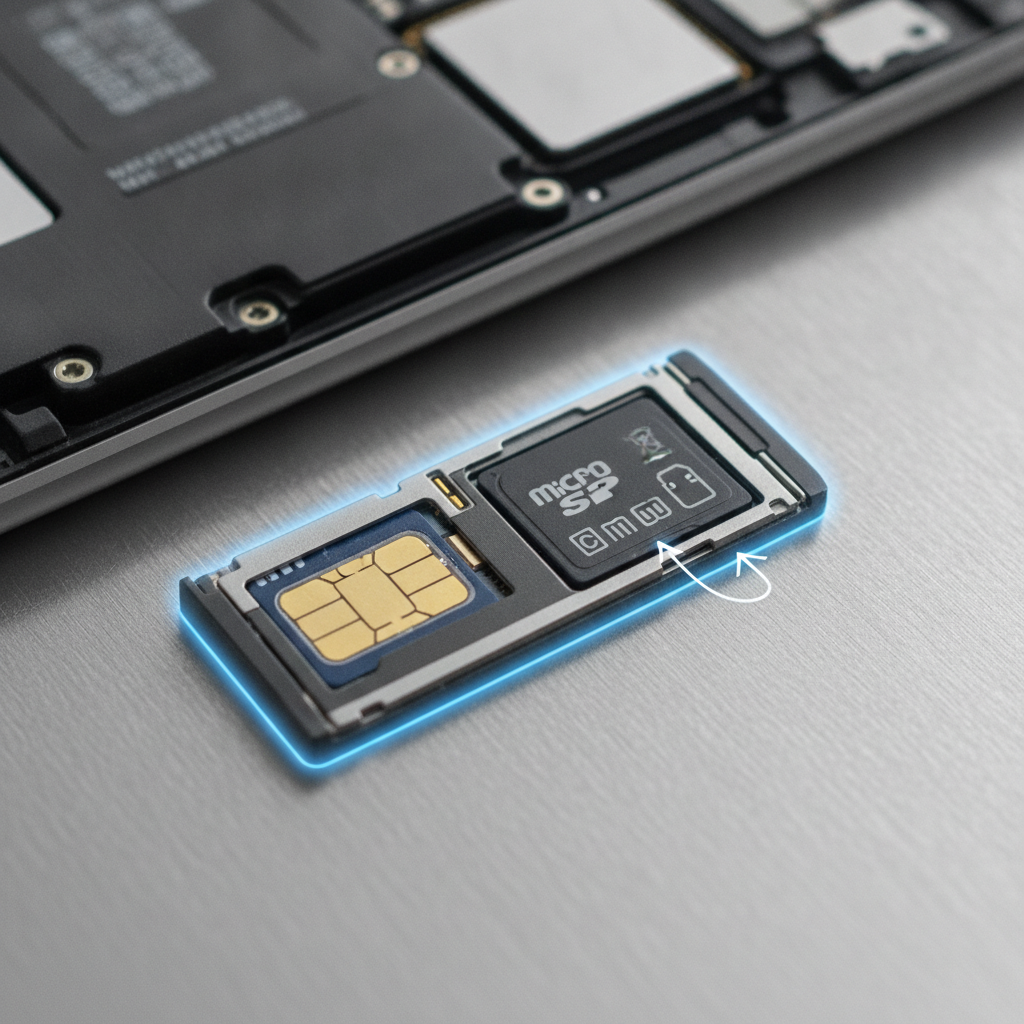
The short answer: a hybrid SIM slot is a single tray bay that accepts either a second nano-SIM card or a microSD card — never both at the same time.
When you set the phone up, you make a choice. Insert two nano-SIMs and you get dual-SIM service with no storage expansion. Insert one nano-SIM plus a microSD card and you get extra storage with a single line. The reader hardware behind that shared bay can speak to both card types, detects which one you've inserted, and the phone enables either the second line or the storage accordingly.
Chester Takau
Chester Takau is an independent reviewer of dual-SIM and eSIM technology, testing setups from the Pacific where connectivity choices really matter.
How a hybrid SIM slot actually works
A hybrid tray usually has two bays. The first is a plain nano-SIM slot — that's your primary line. The second bay is the hybrid one: its recess is shaped so it can physically hold either a nano-SIM or a microSD card, and Samsung's own explainer on dual and hybrid SIM describes the layout exactly this way. You can see it yourself if you eject the tray: one outline marked "SIM 1," and a second outline marked something like "SIM 2 / SD."
The clever part is in the reader. A nano-SIM and a microSD card use different electrical interfaces, so the reader circuitry behind that second bay is built to handle both protocols. On insertion, the phone detects which card type is present and routes it to the right subsystem — the modem for a SIM, the storage controller for a microSD. There is no setting to toggle; the choice is purely physical, made when you load the tray.
If you're new to running two lines, it's worth understanding how dual SIM works when two cards share one phone — the hybrid bay is just the gatekeeper deciding whether that second line can exist at all. For the full definition and the tray variants you'll see on spec sheets, our pillar guide on what a hybrid SIM slot is and how the shared tray is laid out goes deeper.
The software mirrors the hardware. Load a microSD card and the "SIM 2" entry greys out or disappears from your SIM settings — the phone no longer has a second subscriber identity to manage. Load two nano-SIMs instead, and both lines idle side by side; how dual standby works when both SIMs are active explains what happens to calls and data from there.
Hybrid slot vs. dedicated slot vs. eSIM-only
The confusion usually starts with marketing copy. "Supports microSD up to 1TB" tells you nothing about whether the card has its own home. There are three layouts on sale in 2026, and they are not interchangeable:
| Layout | What the tray holds | What you give up |
|---|---|---|
| Hybrid dual-SIM tray | 2 nano-SIMs, or 1 nano-SIM + microSD | Either your second line or your storage expansion |
| Dedicated triple slot | 2 nano-SIMs + microSD, all at once | Nothing — but few phones still offer it |
| eSIM-only | No physical tray at all (or one SIM + eSIM) | Physical SIM flexibility; microSD is usually gone entirely |
Mapping that onto actual 2026 phones — this is the part buyers usually have to piece together from scattered spec pages:
| Phone (2026) | Slot type | What it means for you |
|---|---|---|
| Samsung Galaxy A56 | Hybrid | 2 nano-SIMs, or 1 nano-SIM + microSD up to 1TB (spec breakdown) |
| Samsung Galaxy A17 5G | Hybrid | Shared SIM/microSD tray, cards up to 2TB (Samsung support) |
| Motorola Moto G Stylus (2026) | Dedicated | One of the few with a true non-hybrid 1TB microSD slot (BGR's 2026 roundup) |
| iPhone 17 series | eSIM-only (in more markets) | No tray tradeoff — but no microSD at all (Cybernews) |
The wider trend isn't encouraging if you like physical cards. Android Authority's 2026 roundup found only six current Android phones that still ship with any form of microSD support — most of them via hybrid trays. Buying guides now explicitly warn shoppers to verify the tray layout, since "SD-compatible" in a listing often just means a hybrid slot in disguise (Wondershare's 2026 guide is one example).
The frustrations around this forced choice are well covered in this video breakdown of the problem:
Which slot should you sacrifice — SIM 2 or the SD card?
Mechanically, there's only one answer: the microSD card always takes SIM 2's place. The real question is which loss hurts less, and that depends entirely on how you use the phone. This is the decision most articles skip, so here's a scenario-based way to think about it:
| If you are… | Better use of the hybrid bay | Why |
|---|---|---|
| A commuter juggling work and personal numbers | Second SIM | Two live lines beat storage; cloud and streaming cover the gap |
| A photographer or offline-media hoarder | microSD | Large local libraries need the card; one line is enough |
| A traveler whose phone supports eSIM | microSD + eSIM for line 2 | The eSIM carries your second number, freeing the bay for storage — the tradeoff disappears |
That third row is the quiet resolution to this whole problem, and it's worth pausing on: on most hybrid-tray phones that also support eSIM, you can run a physical SIM in bay 1, a microSD in the hybrid bay, and your second line as an eSIM. Two lines and expanded storage, no adapter required.
Can you fit two SIMs and a microSD with an adapter?
A cottage industry of "hybrid SIM adapters" exists for exactly this. The idea is to stack or ribbon-mount a nano-SIM against a microSD so both plug into the shared bay at once, and how-to sites like this walkthrough sell the dream.
Treat it as a gamble, not a fix. Trays are machined to tight tolerances, and a stacked card combo can end up thicker than the bay allows. The documented risks in the XDA forums' hands-on thread and reviewer warnings are consistent: jammed trays, bent reader pins, damaged cards, and a phone that needs a service visit because the tray won't come out. If the phone is one you rely on daily, the eSIM route above is the safer version of the same outcome.
Why manufacturers moved to hybrid trays — and why they're fading
The hybrid slot wasn't pure cost-cutting. GSMArena's Counterclockwise retrospective on dual-SIM and microSD history makes the engineering case: a dedicated third bay needs board area, reader hardware, and a longer tray, and combining slots freed that space for bigger batteries, larger camera modules, or thinner bodies. That's a real tradeoff, made deliberately.
The next step in that story is the eSIM transition. Flagships are dropping physical trays entirely in more markets — the iPhone 17 series and some Galaxy S variants among them — which pushes hybrid trays down into the budget and mid-range tier, where models like the Galaxy A17 5G still ship them in 2026. So the honest answer to "should I even care about this?" is: yes, if you're buying a budget or mid-range Android with a memory card in mind; less so every year if you're on a flagship, where the choice is being removed rather than constrained.
How to check a phone's slot layout before you buy
Thirty seconds of checking saves a frustrating return:
- Read the spec sheet wording. "Hybrid Dual SIM," "SIM 2 or microSD," or "shared SIM slot" means the tradeoff exists. "microSD (dedicated slot)" means three separate positions.
- Ask the one question that matters: does the tray have two card positions or three?
- Check the phone maker's support page for the exact model — tray layouts sometimes differ by region on the same phone name.
- Already holding the phone? Eject the tray with the pin and look. A hybrid tray shows one nano-SIM outline and a second outline shaped for either card, usually labeled "SIM 2 / SD."
FAQ
Can I use two SIM cards and a microSD card at the same time in a hybrid slot?
No — the shared bay physically holds one card. The exceptions are phones with a dedicated third slot (like the Moto G Stylus 2026) or moving one line to eSIM, which frees the hybrid bay for storage.
Does it matter which card goes in the shared bay?
Functionally, no. Whichever card you insert is the one the phone reads; there's no performance penalty to either choice. The only "cost" is the card you left out.
Will a stacking adapter damage my phone?
It can. Users report jammed trays and bent contacts when the combined stack exceeds the bay's thickness tolerance. It's a risk-for-a-hack trade, not an endorsed workaround.
Is a hybrid slot a dealbreaker for dual-SIM travelers?
Less than it used to be. If the phone supports eSIM, put your home or travel line on the eSIM and keep the microSD. If you genuinely need two physical SIMs plus a memory card, narrow your search to dedicated-slot phones before you buy.
Sources
- Samsung — What is a Dual or Hybrid SIM?
- Samsung US support — Galaxy A17 5G SIM/microSD tray
- GSMArena — Counterclockwise: dual SIM slots and microSD cards
- Android Authority — Android phones with microSD slots you can still buy in 2026
- BGR — Android phones that still come with a microSD card slot in 2026
- XDA Forums — dual SIM + microSD in a hybrid slot, hands-on
- Cybernews — switching fully to eSIM in 2026
- Wondershare — best phones with an SD card slot in 2026
Updated September 2026.
Transparency note: This article was researched and written by Chester Takau with AI assistance for research gathering and drafting. All recommendations reflect the author's own editorial judgment.


