How to Delete and Restore an eSIM Profile: What Deletion Really Does and How to Get Your Line Back
How to Delete and Restore an eSIM Profile: What Deletion Really Does and How to Get Your Line Back
The short answer
Deleting an eSIM wipes the carrier profile from the eUICC chip inside your phone. There is no undo — Apple states plainly that once you erase an eSIM, the only way back is a new QR code or activation link from your carrier, because most eSIM QR codes are single-use.
Deleting the profile does not cancel your plan or stop billing. To restore service, you have three real options: get the carrier to reissue a fresh activation code, restore from a full encrypted backup (on supported setups), or — if the profile is still live on another phone — transfer it instead of deleting.
Chester Takau · DualSIMCardPhone
Chester Takau is an independent reviewer of dual-SIM and eSIM technology, testing setups from the Pacific where connectivity choices really matter.
eSIM Recovery Path Checker
Answer four questions and get the restore route that fits your situation — based on the reissue and transfer realities covered below.
What deleting an eSIM actually does
An eSIM is two things at once: a small chip soldered into your phone (the eUICC) and the downloadable profile — your carrier plan — that sits on it. Deleting an eSIM removes the profile from that chip. The chip stays; the plan's credentials are gone from the device. If you want the underlying mechanics, we have a full explainer on what an eSIM is and how embedded SIMs work.
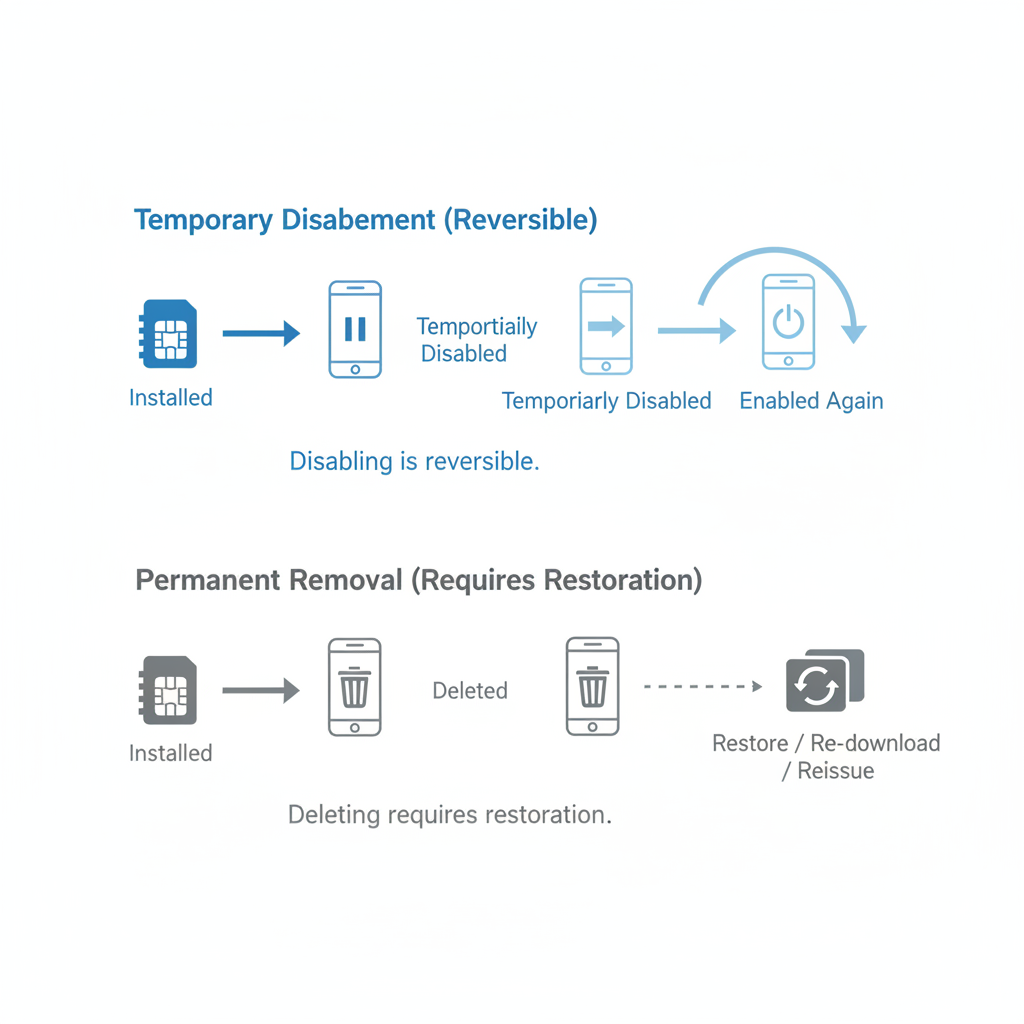
Four actions get constantly confused here, and mixing them up is how people lose service or keep paying for plans they thought they cancelled:
- Turn off / disable the line — the profile stays on the chip, dormant. You can toggle it back on in seconds. This is what you want for a travel eSIM you might reuse, or a second line you're pausing.
- Delete the eSIM — the profile is erased from the eUICC. No undo, no trash folder, no confirmation code sent later. Getting it back means a fresh activation from the carrier.
- Reset network settings — wipes Wi-Fi passwords, Bluetooth pairings and APN data, but eSIM profiles survive. This is the fix for activation bugs, not a deletion method.
- Cancel the plan — a billing action that happens at the carrier, not on the phone. Deleting a profile never cancels anything.
If you haven't deleted yet: a 60-second checklist
Most of the pain in this topic happens before anyone reads a guide. Run through this first:
- Would transferring work better than deleting? If you're switching phones, iOS 26.3 moved eSIMs directly between iPhone and Android, and Samsung's One UI 8.5 has a "Transfer SIM from iPhone" tool — both skip the carrier entirely (details in the restore section below).
- Check the reissue policy. This matters most for prepaid travel eSIMs: some resellers will not reissue a deleted profile at any price.
- Note your EID and the plan's ICCID (screenshot the eSIM details page). Support agents ask for both.
- Know where you'll get internet for the reinstall. If the eSIM is your only line, you'll need Wi-Fi to download the replacement profile.
How to delete an eSIM on iPhone (iOS 26)
- Open Settings → Cellular (labelled Mobile Service in some regions).
- Under SIMs, tap the plan you want to remove.
- Tap Delete eSIM and confirm.
That's the whole procedure — the danger isn't the taps, it's everything around them. If the deleted plan was your default line, iOS reassigns calls, texts and data to whatever line remains, and if it was your only line, your iMessage and FaceTime registrations for that number drop with it.
Video walkthrough of the current iOS 26 deletion flow.
How to delete an eSIM on Samsung Galaxy and other Android phones
- Open Settings → Connections → SIM manager.
- Tap the eSIM profile.
- Tap Remove (on some models, Delete) and confirm.
On other Android skins the path is similar: Settings → Network & internet → SIMs, pick the eSIM, then remove or erase.
Samsung owners should know about a documented quirk. Community threads across the Galaxy A54, S24, S25 and Z Fold/Flip generations report deletions that silently fail — the UI says the profile is gone, but it reappears elsewhere (one user found a deleted eSIM still listed inside Sound settings), errors out with "couldn't connect with SIM," or blocks adding a replacement eSIM. If removal seems to work but the phone behaves like it didn't:
- Restart the phone and check SIM manager again.
- Reset network settings (Settings → General management → Reset → Reset mobile network settings). This keeps remaining eSIMs but clears stale radio state.
- Install any pending software update — several of these threads resolved after a firmware bump.
- As a last resort, a full factory reset with the "erase eSIMs" option ticked clears ghost profiles — but that's scorched earth, so exhaust the steps above first.
What happens to your other line on a dual-SIM phone
Deleting one eSIM does not touch the second line. On a phone running physical SIM + eSIM, or two eSIMs, the surviving profile keeps its number, its plan and its signal. What changes is the routing around it:
- Default voice and text line — if the deleted profile was your default, the phone silently promotes the remaining line. Worth a check before your next call.
- Cellular data assignment — data switches to the remaining line automatically. This is exactly how people get burned: aloSIM published a case study of a traveller whose eSIM worked perfectly, yet whose primary SIM stayed active in the background and racked up a roaming bill of about $347. Deleting a profile reshuffles which line talks to the network — verify the data line after any SIM change, not before a trip's first day is over.
- iMessage and FaceTime (iPhone) — the deleted number deregisters. If the remaining line wasn't previously enabled for iMessage, turn it on under Settings → Apps → Messages → Send & Receive.
How to restore a deleted eSIM profile
Deleted the profile on purpose? You’re in the right place. If instead your activation code was rejected or expired and the profile was never removed, see our fix for an eSIM QR code that has expired — this page covers recovery after a profile has been deliberately deleted.
Here the honest part: Apple's own support page says that after you erase an eSIM, you need to contact your carrier for a new QR code or activation link. Samsung's guidance reads the same way. There is no recently-deleted folder for SIM profiles. What you actually have are these three paths, in order of preference.
Option 1: Transfer it from another device (if the profile still exists somewhere)
This is the path most guides miss, and in 2026 it's often the fastest. iOS 26.3 added native eSIM transfer between iPhone and Android — before that, every iPhone-to-Android switch meant a full carrier deactivation and reactivation cycle — and iOS 26 can move multiple numbers in one flow, according to Ohayu's iOS 26 eSIM breakdown. Going the other direction, Samsung's One UI 8.5 ships a "Transfer SIM from iPhone" tool that, as of mid-2026, works with AT&T, FirstNet, T-Mobile and Verizon in the US, KDDI in Japan, Deutsche Telekom in Germany, SFR in France and EE in the UK, per Sammy Fans' coverage. If your profile is still live on an old phone, move it — don't delete and hope.
Option 2: Restore from a full encrypted backup
On supported setups, a full encrypted backup made to a computer (via Finder or iTunes) can include eSIM profiles, so restoring that backup can bring a deleted profile back without any carrier involvement. It's device- and carrier-dependent, which is why most guides skip straight to "call your carrier" — but if the backup exists, it costs nothing to try first.
Option 3: Get a fresh activation code from your provider
The default path, and the one you need to plan around. The critical fact: most eSIM QR codes are single-use. Once a code has been installed and the profile deleted, rescanning it fails — TripoSIM's QR troubleshooting guide lists a dead, already-redeemed code among the most common reasons scans fail. You need a newly issued code, which means the provider has to generate one. Once you have it, the install flow is identical to a first-time activation — our walkthrough on how to set up eSIM on any phone, step by step covers that process for both platforms.
How hard is reissue? It depends who sold you the eSIM
Every guide ends with "contact your carrier," and almost none of them say what that actually involves. The friction varies enormously by provider type — it's the difference between a five-minute fix and buying the same plan twice. Based on current 2026 guidance from sources like Unloky, here's the realistic picture:
| Provider type | How you get a new eSIM | Typical wait | Real risk |
|---|---|---|---|
| Major postpaid carrier (AT&T, Verizon, T-Mobile) | Self-serve in the carrier app or account portal ("Replace SIM" / "Switch device"), or a support call | Often minutes | Low — reissue is routine |
| MVNO / prepaid carrier brand | In-app reissue or a support ticket | Hours to about a day | Medium — depends on support quality |
| Prepaid travel-eSIM reseller | Email or in-app support; policy varies by seller | Minutes to never | High — some sellers refuse reissue, so you repurchase |
That last row is why the "should I delete this travel eSIM?" question deserves a pause. If the plan is still within its validity window and the seller won't reissue, deleting the profile throws away paid-for data.
Will deleting my eSIM cancel my plan or stop billing?
No — and this is the single most common misunderstanding in the forum threads. The plan is a contract and a billing record at the carrier; the eSIM profile is just the key that lets your phone connect to it. Deleting the key doesn't end the contract. Postpaid plans keep billing until you cancel with the carrier. Prepaid plans keep burning validity whether the profile is on your phone or not — which also means that if you delete by accident, your paid credit is usually still sitting in your account waiting for a reissued profile. If your plan is prepaid and you intend to keep it, our guide shows how to recharge an eSIM without getting a new number or losing the profile in the process.
Does a hard reset remove the eSIM?
Only if you tell it to — a question asked almost verbatim in a Galaxy S24 community thread. Both platforms ask during the erase flow: on iPhone, Erase All Content and Settings lets you keep your eSIMs or wipe them; Samsung's factory reset presents an eSIM erase option as well. So a factory reset for troubleshooting can keep your profiles intact — while a reset before selling the phone should delete them deliberately, since a profile left on a sold phone is a profile the next owner could, in theory, activate against.
Recovery may get easier — but don't plan around it
Two signals from the last year are worth knowing. In October 2025 Apple was granted US Patent 12,452,644 B2, "Deleted eSIM recovery", describing a method for recovering a profile after deletion from the eUICC — exactly the undo that doesn't exist today. A patent isn't a shipped feature, but it tells you Apple considers the current all-or-nothing model a problem worth solving. On the standards side, the GSMA released SGP.22 v2.7 in April 2026, an incremental update to the remote provisioning spec consumer eSIMs run on — the underlying model is unchanged, so nothing about deletion or recovery works differently this year. Until something ships, treat deletion as permanent.
Frequently asked questions
My eSIM profile was deleted — can I recover it directly?
Not from the phone itself. This Apple Community thread from January 2023 is still collecting replies because the answer hasn't changed: no on-device recovery exists. Your options are a transfer from another device, an encrypted backup restore, or a carrier reissue — in that order of convenience.
Can I restore my eSIM from a screenshot of the QR code?
Almost never. Most activation codes are single-use: once redeemed, the code is dead whether you kept a screenshot or not. The screenshot is still useful — support agents can pull the ICCID and activation details from it to speed up reissue.
Do I need Wi-Fi to delete or reinstall an eSIM?
Deletion is local to the chip — no connection needed. Reinstalling is the opposite: the phone must download the profile from the carrier's provisioning server, so you need Wi-Fi or another active line with data.
What happens if I delete my only active line?
The phone drops off the network immediately: no calls, no SMS, no mobile data on that number. Your plan keeps billing. Any services tied to that number (iMessage, FaceTime, WhatsApp re-verification, bank OTPs) lose their channel until the profile is reissued and reinstalled — so line up Wi-Fi and a reissue before you tap delete.
Sources
- How to erase an eSIM on your iPhone or iPad — Apple Support
- eSIM QR Code Not Working? 9 Quick Fixes — TripoSIM, 2026
- What Happens If You Delete an eSIM? — Unloky, 2026
- iOS 26 eSIM features: iPhone-to-Android transfer — Ohayu, 2026
- Samsung to support iPhone eSIM transfers in One UI 8.5 — Sammy Fans, October 2025
- US Patent 12,452,644 B2 — Deleted eSIM recovery — USPTO Gazette, October 2025
- SGP.22 v2.7 Remote SIM Provisioning specification — GSMA, April 2026
- My eSIM horror story — aloSIM
Updated September 2026.
Transparency note: This article was researched and written by Chester Takau with AI assistance for research gathering and drafting. All recommendations reflect the author's own editorial judgment.


