How to Use a Hybrid SIM Slot: Dual SIM or microSD, Done Right
How to Use a Hybrid SIM Slot: Dual SIM or microSD, Done Right
By Chester Takau · Updated September 2026
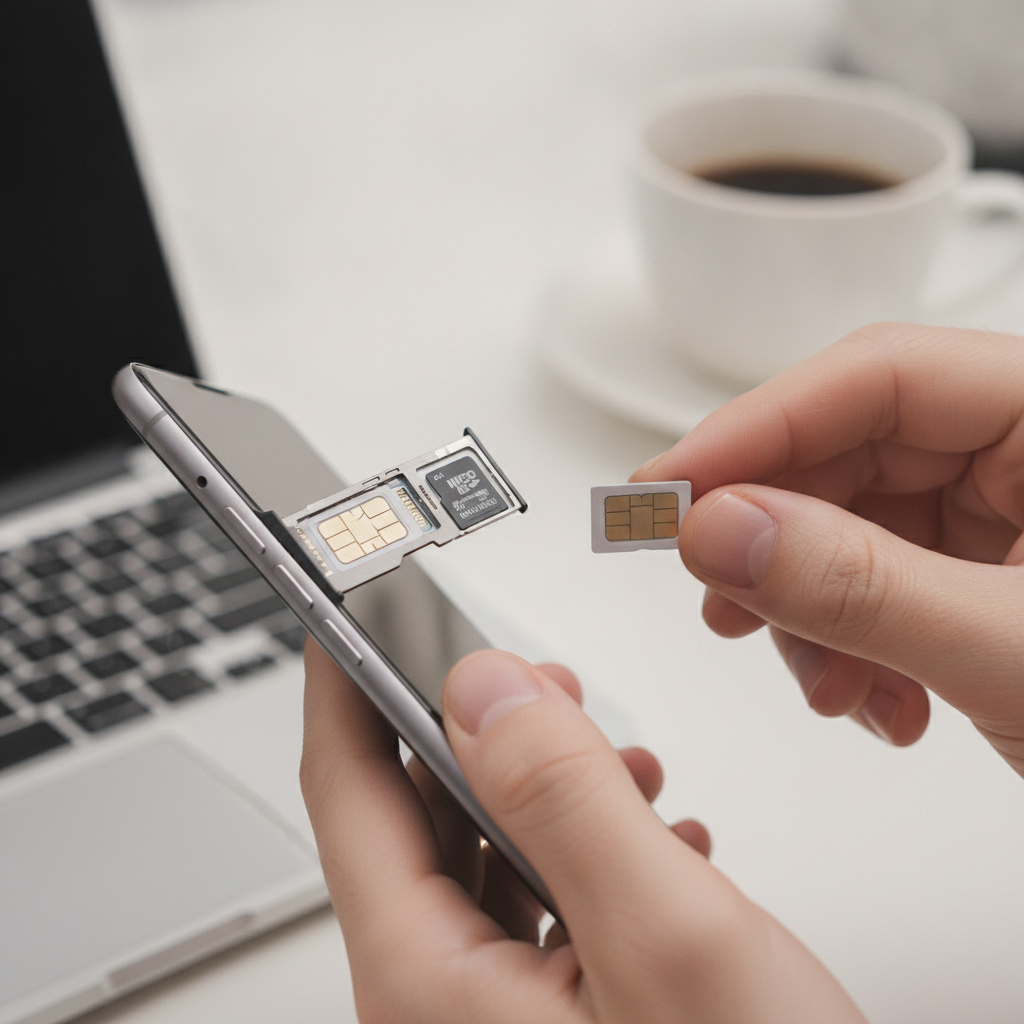
The short answer: a hybrid SIM slot is one shared position on your phone's SIM tray that accepts either a second nano-SIM or a microSD card — never both at the same time. To use it:
- Power the phone off and eject the tray with the SIM tool.
- Find the position marked SIM2/microSD (or just "SD") — that's the shared hybrid position.
- Seat your second SIM or your microSD card there, gold contacts facing the way the tray outline shows.
- Slide the tray back in gently, then finish in Settings: set your default SIMs for calls, texts and mobile data, or format the card under Storage.
About the author: Chester Takau is an independent reviewer of dual-SIM and eSIM technology, testing setups from the Pacific where connectivity choices really matter. He writes for DualSIMCardPhone.
Hybrid slot setup finder
Tell the tool what you need from the tray and it will show you the configuration that actually works — including the eSIM workaround when you want two lines and extra storage.
General guidance only — tray layouts vary by model, so check your phone's manual or the markings on the tray itself before inserting anything.
Why the slot forces a choice at all
The hybrid position isn't two slots stacked together — it's a single set of electrical contacts on the board with a tray cut-out shaped so that either a nano-SIM or a microSD card can sit over those contacts. The phone detects which card type is present and talks to it accordingly. That's the plain reason two cards can't share the position: there is only one physical interface underneath. Sony's own support page gives the same answer to the perennial "why can't I run two SIMs and a microSD at once?" question — it comes down to the shared tray and contact design, not software. If you want the full background, we've covered what a hybrid SIM slot is and why the tray is shared in a separate explainer, and Airtel's overview of how hybrid slots work lines up with Samsung's definition of dual vs hybrid SIM.
Step by step: using the hybrid SIM slot
1. Power off and eject the tray. Some phones tolerate hot-swapping, but powering down avoids card-detection glitches. Use the bundled eject pin — and make sure you're pressing the tray's eject hole, not the microphone pinhole that often sits right next to it. Poking the mic with the pin is a classic way to damage it.
2. Identify the positions on the tray. This is the step that trips most people up. The hybrid position is almost always labelled SIM2/microSD or SD on the tray itself; the SIM1 position takes a nano-SIM only. Some trays are double-sided, with SIM1 on one face and the shared position on the other. If the markings have worn off, your manual or the manufacturer's support page will show the layout.
3. Seat the card correctly. Lay the card into its outline flat — nano-SIMs have a notched corner that only fits one way, and microSD cards sit in a wider, thinner recess. Gold contacts face whichever direction the tray diagram indicates (usually down, toward the phone's board). The card should sit flush; if it protrudes, it's in the wrong orientation.
4. Reinsert without forcing. The tray should glide in with light finger pressure. Resistance means something is misaligned — pull it back out and re-seat the card. Forcing the tray is how pins bend and trays crack.
5. Configure in software. For dual SIM: open Settings → SIM manager (Samsung) or Network & internet → SIMs (Pixel/stock Android), rename the lines, and choose which SIM handles calls, texts and mobile data by default. For a microSD card: open Settings → Storage and format when prompted — most phones set the card up as portable storage for photos and media, which is what you want.
The short walkthrough below shows exactly this process — swapping the SIM2 position over to a microSD card on a hybrid tray:
Hybrid slot vs the alternatives: what you gain and give up
The core disadvantage of a hybrid tray is the forced trade-off: dual SIM or expandable storage, not both. Here's how the realistic configurations compare in 2026:
| Configuration | What you get | What you give up | Best for |
|---|---|---|---|
| Hybrid tray, two nano-SIMs | Two active lines (calls, texts, data on either) | No microSD — internal storage only | Work/personal numbers, travel SIMs |
| Hybrid tray, SIM + microSD | Cheap extra storage (cards up to 1TB on many models) | Second line has nowhere to go | Single-line users with big photo/video libraries |
| Dedicated triple slot (2 SIM + SD) | Everything at once | Increasingly rare, mostly budget models | Buyers who refuse the trade-off |
| Hybrid tray + eSIM | Two lines (one eSIM, one physical) plus microSD in the shared slot | Needs eSIM support from both phone and carrier | Anyone who wants it all on a modern phone |
Can you run two SIMs and a microSD at the same time?
Not inside the tray — that question comes up constantly on XDA Forums and Samsung's community boards, and the honest answer stays the same. But there are three workarounds, in order of safety:
Move one line to eSIM. If your phone and carrier support it, convert one line to an eSIM profile, keep the other physical SIM in SIM1, and the shared position is free for your microSD card. This is the clean solution, and it takes about ten minutes — our guide shows how to set up eSIM on any phone step by step. It also pairs naturally with travel: if the reason you want dual SIM is a local data SIM abroad, read our walkthrough on setting up a dual SIM phone for travel before you fly.
Use a third-party "hybrid adapter" — at your own risk. These thin ribbon-cable gadgets route one SIM outside the tray so the shared position can hold both a SIM and a microSD. They can work, but the tolerance inside a SIM tray is fractions of a millimetre, and forums are full of cautionary tales: XDA's adapter thread debates whether they're worth it, while a HardForum thread on damaged SIM trays shows what happens when one gets stuck. If you try one, insert slowly and never force the tray.
Software unlocks (advanced, unsupported). Some rooted devices have Magisk modules claiming to enable dual SIM + SD simultaneously on hybrid trays. These are unofficial, device-dependent, and can break with any software update — treat them as experiments, not solutions.
Verify your exact model before you buy or insert anything
Don't trust a spec sheet alone — check the tray. The Galaxy A56 5G is the cautionary tale of 2026: Samsung's official US support page states external microSD storage is "not supported," while retail listings and spec aggregators still describe a hybrid SIM2/microSD tray good for up to 1TB. Buyers have been arguing about it in Samsung's own community forums for months. The fastest verification: eject the tray on the actual phone and look for a microSD-shaped recess in the shared position. Region and carrier variants of the same model sometimes differ, so a YouTube review of "the" phone may not match yours.
Context matters here, because hybrid trays are quietly becoming a budget and mid-range feature. Android Authority's 2026 roundup of phones still shipping with microSD slots is down to a short holdout list — the TCL NXTPAPER 70 Pro, the Moto G 2026, and a handful of others. At the flagship end, Apple's iPhone Fold, due in the second half of 2026, drops the physical tray entirely for eSIM, and industry commentary now calls 2026 the tipping point for eSIM-only phones, with US Pixel 10 models already tray-free. If expandable storage matters to you, treat a hybrid slot as a buying criterion to confirm — not a feature to assume.
If a card or adapter gets stuck in the tray
Power off first — don't keep poking a live board. Never use metal tools to fish a card out; a wooden toothpick or plastic spudger is the safest improvised tool, used with gentle leverage. If the tray itself is jammed halfway, wiggling harder usually bends the internal contacts and turns a cheap repair into a board-level one. At that point, a service centre visit is the smart move; a replacement tray costs very little, but damaged pins on the board do not.
Hybrid SIM slot FAQ
Can I use two SIM cards and a microSD card at the same time in a hybrid slot?
No — the shared second position physically holds one card. The only clean way to get two lines plus a microSD is to move one line to eSIM, freeing the hybrid position for the card. Ribbon adapters are a maybe-at-your-own-risk workaround.
Which slot is SIM2 and which is the hybrid/microSD slot on my tray?
Look at the markings printed on the tray: the hybrid position is labelled "SIM2/microSD" or "SD," while SIM1 takes a nano-SIM only. On double-sided trays, the shared position is usually on the opposite face from SIM1.
Does it matter which slot I put my primary SIM in?
On most phones from the last several years, no — both positions support 4G/5G and VoLTE equally, a point XDA users have confirmed across many models. Some older phones restricted the fastest data or VoLTE to SIM1, so if you're on ageing hardware, check the manual.
Is it safe to use a hybrid SIM adapter?
"Safe" is too strong a word. They exist, they sometimes work, and they regularly jam trays or damage contacts. If you must use one, insert it slowly, never force resistance, and accept that you may be paying for a tray replacement.
Why don't phone makers just give us two SIMs plus microSD simultaneously?
Space and wiring. The SIM2 and microSD functions share one set of contacts over the same patch of board, and adding a third dedicated position costs internal volume that manufacturers would rather spend on battery. With flagships now moving to eSIM-only designs, the industry is clearly solving the problem by removing slots, not adding them.
Sources
- Samsung — What is a Dual or Hybrid SIM?
- Sony Support — Why can't I use two SIM cards and one microSD card at the same time?
- Airtel — What is a hybrid SIM slot and how it works
- Android Authority — Android phones with microSD card slots you can still buy in 2026
- Gadget Hacks — Apple iPhone Fold goes eSIM-only in 2026 launch
- esimphony — Why 2026 is the tipping point for eSIM
- Samsung US — Galaxy A56 5G device set up
- XDA Forums — Hybrid dual SIM + SD card adapter discussion
Updated September 2026.
Transparency note: This article was researched and written by Chester Takau with AI assistance for research gathering and drafting. All recommendations reflect the author's own editorial judgment.


